Introduction
In the rapidly evolving field of artificial intelligence, leveraging pre-trained models has become a key strategy for developing powerful and efficient generative AI applications. Fine-tuning a pre-trained model allows developers to adapt these models to specific tasks, ensuring optimal performance without the need for extensive training from scratch. This article will walk you through the process of fine-tuning a pre-trained model for generative AI applications, providing clear, simple, and actionable steps.
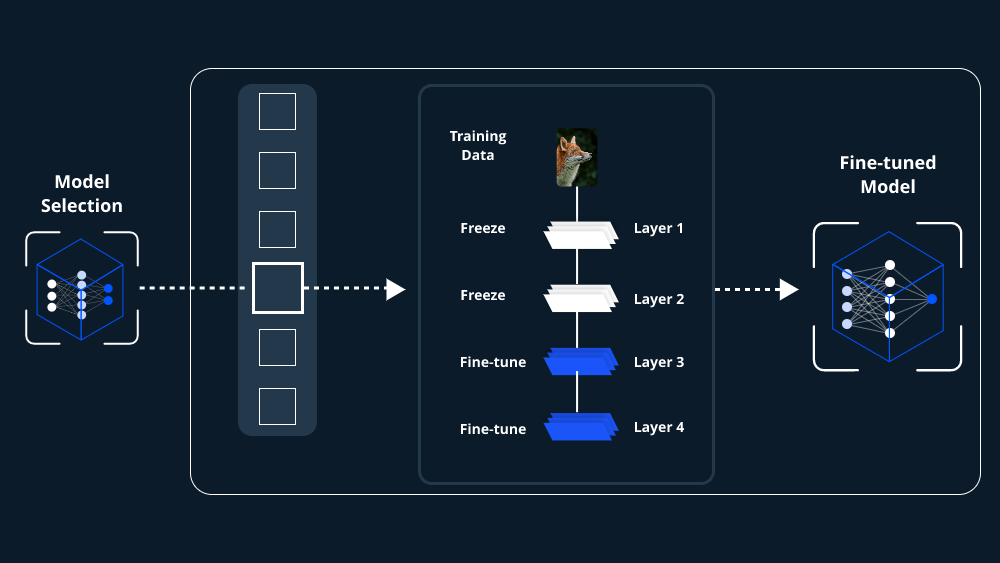
Understanding Pre-Trained Models and Generative AI Applications
Before diving into the fine-tuning process, it’s essential to grasp the basic concepts of pre-trained models and generative AI applications.
- Pre-Trained Models: These are AI models that have already been trained on large datasets, usually for a broad range of tasks. This pre-training enables the model to recognize patterns, understand language, or generate content with a significant level of accuracy. However, for specific applications, these models may require additional training, known as fine-tuning.
- Generative AI Applications: Generative AI refers to systems that can create new content, such as text, images, music, or even code. Applications like ChatGPT, DALL-E, and MidJourney are prominent examples of generative AI. Fine-tuning these models ensures they produce content tailored to specific domains or tasks.
Why Fine-Tune a Pre-Trained Model for Generative AI Applications?
Fine-tuning a pre-trained model for generative AI applications offers several advantages:
- Improved Performance: By fine-tuning, the model can be optimized for a specific task, leading to more accurate and relevant outputs.
- Resource Efficiency: Fine-tuning leverages existing knowledge within the model, reducing the need for extensive computational resources compared to training a model from scratch.
- Domain Adaptation: It allows the model to adapt to specific domains or industries, making it more effective in generating content relevant to particular fields.
Steps to Fine-Tune a Pre-Trained Model for Generative AI Applications
Fine-tuning a pre-trained model for generative AI applications involves several crucial steps:
1. Select the Right Pre-Trained Model
The first step is choosing a pre-trained model that closely aligns with your generative AI application’s requirements. Popular models like GPT, BERT, and T5 are commonly used for text generation, while models like StyleGAN and BigGAN are popular for image generation. The choice depends on the type of content you want to generate.
2. Prepare the Dataset
To fine-tune a pre-trained model, you need a dataset that closely matches the type of output you desire. For instance, if you’re working on a generative AI application that creates legal documents, your dataset should consist of legal texts. Ensure the data is clean, well-labeled, and representative of the domain.
3. Set Up the Fine-Tuning Environment
Before you begin fine-tuning, set up a suitable environment. This typically involves:
- Hardware Requirements: A robust GPU is often necessary, especially for large models. Cloud services like AWS, Google Cloud, or Azure provide suitable environments for fine-tuning.
- Software Requirements: Python is the primary programming language, with frameworks like TensorFlow, PyTorch, or Hugging Face’s Transformers library being widely used for fine-tuning tasks.
4. Load the Pre-Trained Model
Using the chosen framework, load the pre-trained model. For example, in Hugging Face’s Transformers library.
5. Adjust Model Hyperparameters
Hyperparameters control various aspects of the training process, such as learning rate, batch size, and the number of epochs. Fine-tuning a pre-trained model for generative AI applications often requires experimenting with these settings to achieve the best results.
- Learning Rate: A lower learning rate is often better for fine-tuning, as it allows the model to make more subtle adjustments to its weights.
- Batch Size: Adjust the batch size based on your computational resources. Smaller batch sizes may lead to more stable fine-tuning.
6. Fine-Tune the Model
Begin the fine-tuning process by running your model on the prepared dataset. During this phase, the model’s weights are adjusted to better suit the specific task. Monitoring the model’s performance on validation data is crucial to avoid overfitting.
7. Evaluate and Optimize the Model
Once fine-tuning is complete, evaluate the model’s performance using metrics relevant to your application. For text generation, metrics like BLEU, ROUGE, or perplexity may be used. If the model’s performance is not satisfactory, consider further adjustments to the hyperparameters or additional training epochs.
8. Deploy and Monitor the Model
After fine-tuning and evaluation, the final step is to deploy the model. This could be within an application, a web service, or as part of a larger AI system. Continuous monitoring is essential to ensure the model performs well in real-world scenarios, and periodic re-tuning might be necessary as new data becomes available.
Conclusion
Fine-tuning a pre-trained model for generative AI applications is a powerful method to create highly specialized and efficient AI systems. By following these steps—selecting the right model, preparing the dataset, setting up the environment, adjusting hyperparameters, fine-tuning, evaluating, and finally deploying—you can optimize a pre-trained model to meet the specific needs of your generative AI application. This process not only enhances the model’s performance but also ensures that your AI solution is tailored to your unique domain.
 Tech blog
Leave a comment